GUIDE
Backlog Health: Runway, Aging and Stale Items Explained
A flow metric about what's not being worked on yet — how big the backlog is, how long items have been sitting, and how many weeks of work it represents.
What it measures
Backlog health is really three related signals about everything sitting in a "not started yet" state. Backlog size is simply how many items are waiting. Aging breaks that count into buckets by how long each item has been sitting — 0-7 days, 7-30, 30-90, 90-180, and 180+. Runway divides the backlog size by the team's recent weekly velocity, answering a different question than the other two: not "how much is waiting" but "how many weeks of work does that represent, at the pace we're actually shipping."
Why it matters
A backlog is where priorities go to be forgotten. Most planning conversations focus on what's in progress or what shipped recently, because that's what shows up in a standup — the backlog itself rarely gets looked at as a whole, which is exactly why items quietly age there for months without anyone deciding to kill them or promote them. Aging turns that invisible problem into a visible one: a spike in the 180+ bucket is a direct, unambiguous signal that the backlog has stopped being a prioritized list and started being a place things go to die.
Runway matters for a different reason — it's the number that makes "we have too much backlog" or "we need to plan more" a concrete conversation instead of a feeling. A 40-week runway isn't inherently bad, but it's a fact worth knowing before committing to yet another quarter of new initiatives on top of it. It's also one of the few Flow numbers that connects directly to a roadmap conversation: it's the honest answer to "if we stopped adding anything new today, how long would it take to clear what's already on the list."
How to calculate it
Backlog size is a current count of items in a "not started" status. Aging buckets each of those
items by the time since it was created, into fixed ranges — deliberately not configurable, so
charts stay comparable over time and across teams. A stale item is one that
hasn't been updated (any field change, not just a status move) in more than a threshold — 30 days
is a common default, but the right number depends on how actively a team's backlog is meant to be
groomed. Runway is backlog size ÷ average weekly velocity over a recent period — if
velocity is 0 (nothing completed recently), runway isn't a meaningful number and shouldn't be shown
as one.
How to interpret the numbers
There's no published industry benchmark for "the right backlog size" or "the right runway" — it depends entirely on team size, how far ahead a team plans, and how the backlog is used (a working queue vs. a long-term idea dump are very different things wearing the same label). What's useful regardless of team: the shape of the aging distribution. A healthy backlog skews toward the younger buckets, with the older ones getting smaller — items either get worked or get closed. A backlog that skews old, with a growing 180+ bucket, usually means intake is outpacing triage, not that the team is falling behind on execution.
A common trap
The instinct when a backlog looks unhealthy is to schedule a big cleanup — but a backlog that's been aging for 6 months usually stays unprioritized for the same reason a second time: nobody owns the decision to close items that no longer matter. A recurring, lightweight triage habit (even 15 minutes a week looking specifically at the oldest bucket) tends to work better than an occasional big sweep, because it catches items while the context for "do we still need this" is still fresh.
How moasy.tech computes it
moasy.tech tracks backlog size, the 5 aging buckets, a stale-item count (with a configurable threshold) and runway automatically from what's already synced from Jira and Linear — no manual spreadsheet of "what's been sitting too long." Deliberately no priority, effort or story-point scoring baked in — those fields don't exist consistently across every provider, so backlog health stays a factual signal (count, age, pace) rather than an opinionated one.
See the other flow metrics in the full guide, or the complete implementation on the Flow Metrics feature page.
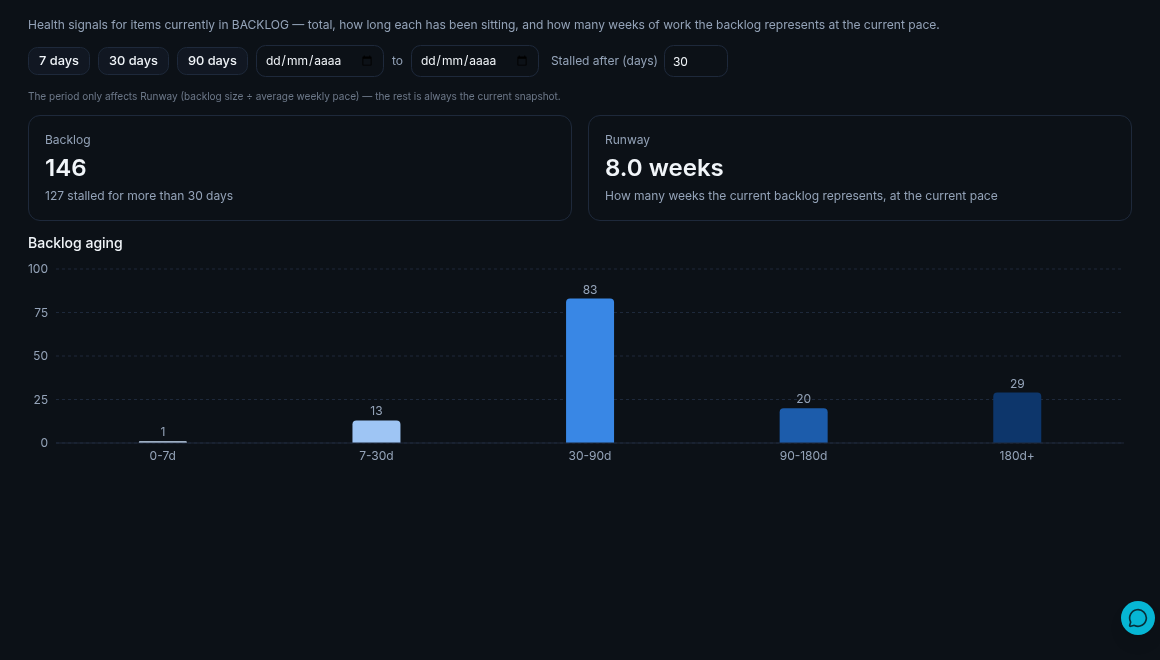
Illustrative data, for demonstration purposes only.
Questions about backlog health
What counts as "not started" for backlog size?
Any item in a status your team's workflow rules classify as backlog — configurable per team, since board setups differ, with a company-wide default as fallback.
Why isn't priority or story points part of this?
Those fields aren't consistent across Jira, Linear and every other provider — some teams use them rigorously, others not at all. Backlog health sticks to facts every integration can actually provide: how many items, how old, and how fast the team is clearing them.
Is a long runway always a problem?
Not inherently — a team that deliberately plans several quarters ahead will have a longer runway than one that only grooms a few weeks out. What's worth watching is the trend: a runway that keeps growing means the backlog is outpacing the team's actual capacity to work through it.
See your own backlog health
Get started free