Not a performance ranking
This view exists to spot rotation, ramp-up and absence over time — not to rank individual output. It's meant to inform a conversation, not settle one.
FEATURE
Roster, monthly capacity, toil ratio, and what each person is actually carrying — built to spot overload and rotation, not to rank anyone.
New to toil ratio, bus factor and the other team health signals? Read our plain-English guide to what they mean and why they matter.
Every team profile pairs its roster and monthly capacity with a toil ratio — hours logged as Toil against the capacity available that month. Drill down to see the same breakdown per contributor: work items by category, pull requests merged and reviewed, deploys triggered (with success rate), incidents handled, and toil hours — for one person, across every team they touch.
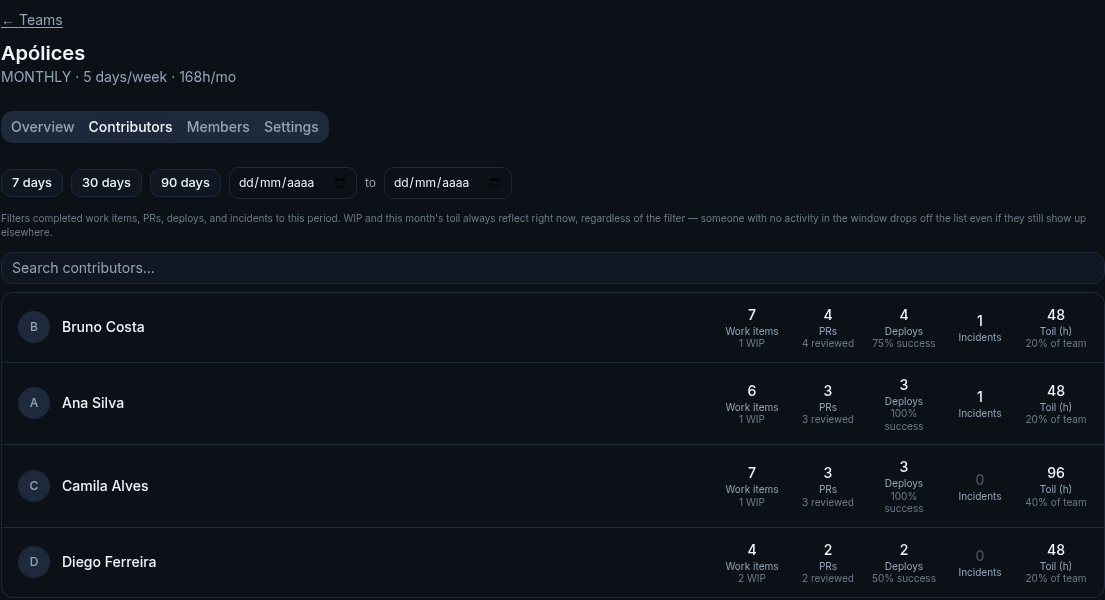
Illustrative data, for demonstration purposes only.
Four numbers round out the picture: deploy success rate (distinct from DORA's change failure rate — this is just how often a deploy finishes cleanly), how many merged PRs went out with zero reviewers, rework (how much merged code gets rewritten again within 14 days), and contribution concentration — the share of a team's work items or PRs carried by its single most active contributor, without naming who. A severity breakdown of incidents rounds it out. None of these rank people; concentration doesn't even expose a name, just a percentage worth a conversation. For a per-person view of elapsed work-item time specifically (not PRs, deploys or incidents), see Activity Reports.
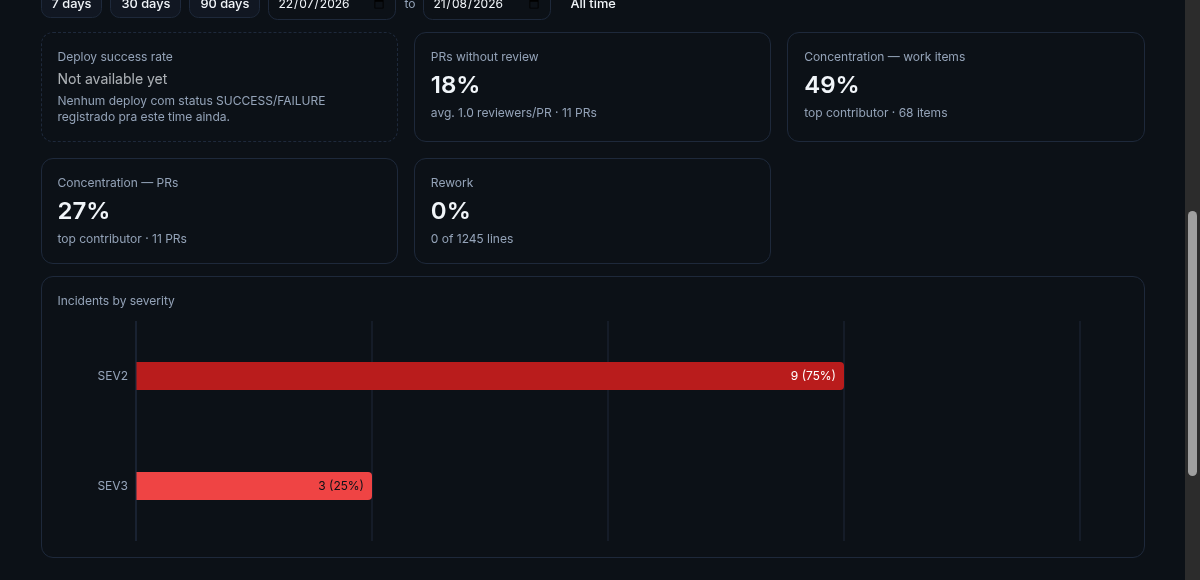
Illustrative data, for demonstration purposes only.
Archive a team once it's done — a reorg, a project that wrapped — and it drops off the active list and stops counting toward your plan's team limit, but its history, roster, work items, deploys and incidents all stay intact. Nothing is snapshotted automatically, so export a printable report first if you want a permanent record before archiving.

Illustrative data, for demonstration purposes only.
Each team gets a default monthly capacity in hours (160 by default). Override it per member with a custom capacity and an allocation percentage — for someone splitting time across two teams, say.
The same synced items, pull requests, deploys and incidents already powering DORA and Flow feed this view — no separate data entry.
Hours in items classified as Toil — same semantic rules as Flow Metrics — are totaled for the current month.
Toil hours divide by that month's capacity — always month-to-date against the full month, on purpose, so you see toil building up in real time.
This view exists to spot rotation, ramp-up and absence over time — not to rank individual output. It's meant to inform a conversation, not settle one.
Toil ratio compares hours actually logged against real monthly capacity — not a gut feeling about who's underwater.
A contributor's numbers cross every team they touch, not just their primary one — useful for people who float across squads.
Every number comes with a trend, so you catch a team quietly sliding into overload before it shows up as attrition.
See your own team's capacity and toil, not a demo.
Get started freeIt's scoped to the current month on purpose — month-to-date compared against that month's full capacity, different from every other metric here, which do respect the date range. Early in the month the ratio tends to look low even on a toil-heavy team, simply because there hasn't been time to complete much yet; that's the intended behavior, not a bug.
Each team has a default monthly capacity in hours (160 by default). Any member can be overridden with a custom capacity and an allocation percentage. The total is always recalculated fresh from the current roster on every request, never cached.
No — it sums capacity and toil hours across every team membership that person has, scaled by each one's allocation percentage.
No. Deploy success rate is just success vs. failure by deploy status — deploys still in progress or cancelled don't count either way. Change failure rate is a different, stricter signal: whether a real incident followed that deploy within a configurable window. A deploy can "succeed" by status and still cause an incident.
No — just the percentage and the sample size (items or PRs). It's meant to flag a bus-factor risk worth discussing, not to point at a person.
Nothing is deleted — history, roster, work items, deploys and incidents all stay intact. The team just drops off the active list and stops counting toward your plan's team limit. No snapshot is saved automatically, so export a report first if you want a permanent record.