HELP
How to Connect Your First Integration
A step-by-step walkthrough, with a real screenshot, of adding a provider connection — using Jira as the example.
Before you start
You'll need to be an Admin — adding a new integration is Admin-only, unlike some other settings (like metric rules) that a Gestor can also change. Anyone with access to the tenant can still view the connected-integrations list and trigger a sync, just not register a new one.
Go to Integrations in the main nav. You'll see a grid of provider cards — Jira, Linear, GitHub, Azure DevOps, Vercel, ArgoCD, Waroom, incident.io — each showing how many connections it already has, if any.
Steps
1. Click a provider card to expand it
Clicking any provider card — connected already or not — opens a panel below the grid with an add-integration form at the top and the list of connections already registered for that provider underneath. There's no separate "add integration" page; it's all on this one screen.
2. Fill in the form
Fields depend on the provider. For Jira: an API token, the Jira Base URL, the account email the token belongs to, and an optional Project Key (leave it blank to sync the whole site instead of one project). You can also optionally assign the integration to a specific team right away, or leave it unassigned and link it later. Some providers — GitHub, Waroom, ArgoCD among them — let you sync everything the token can see first and assign repos/boards to teams afterward, once you have real data to choose from.
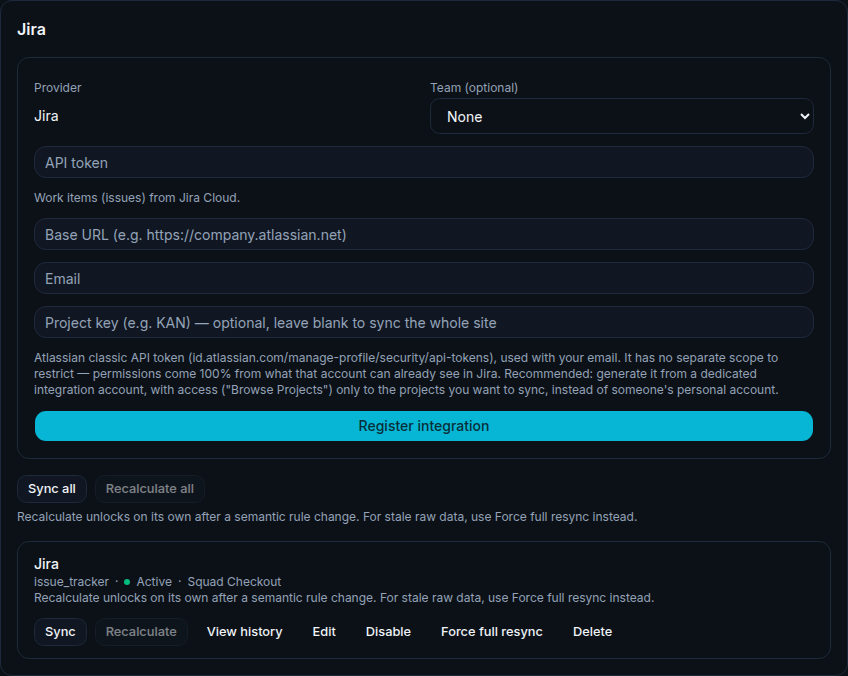
Illustrative data, for demonstration purposes only.
3. Click "Register integration"
The credential is validated against the provider immediately — a bad token fails right here, clearly, instead of getting saved and silently breaking a sync three weeks later.
4. It syncs
Once registered, the integration appears in the connected list with its own sync history, independent of every other integration on that provider. Sync runs incrementally, either triggered manually from that same list or once a day on its own.
Related
See every supported provider and how syncing works on the Integrations feature page.
Questions about connecting an integration
Can I connect two boards from the same provider?
Yes — a single provider can have several integrations, like two Jira boards, one per team, each syncing and being assigned to a team independently.
What happens if I get the credential wrong?
It fails at the "Register integration" step, on the spot — the bad credential never gets saved, so it can't silently break a sync later.
Why can't I see the "Register integration" form?
Only Admins can add a new integration. A Gestor can view the connected list and trigger syncs, but the add form itself is Admin-only.
Connect your own first integration
Get started free